Case Study #4: AI Data Discovery Assistant (Concept)
Designing Trust Signals + Guardrails for Enterprise Query Workflows
(AI Patterns)
Concept prototype created for an internal pitch; visuals and terminology have been generalized to protect confidentiality.
Role: Led UX + prototyping (partnered with an SME / Solutions Architect)
Audience: Internal leadership pitch (concept validation + buy-in)
Format: Concept prototype reconstructed from pitch video; terminology generalized to protect confidentiality.
Why this concept
Enterprise teams often have access to lots of data—but not clarity about:
which sources are relevant,
what’s trustworthy,
what’s permitted,
and what’s safe to execute.
In those environments, an AI assistant’s real job isn’t “answering questions.” It’s helping humans make good decisions by making constraints visible and guiding them through the workflow safely.
The user & job-to-be-done
Primary user: Analyst / ops specialist trying to answer a time-sensitive question.
They need to:
translate a question into the right datasets
confirm quality + freshness + known issues
understand access restrictions and next steps
construct a query without deep schema knowledge
run safely (avoid huge, expensive, or misleading queries)
leave an auditable trail (what was used, what was run, why)
Design goals (what I optimized for)
Trust calibration: show quality, verification status, and known issues up front
Access clarity: users shouldn’t “discover” permissions failures late
Human control: AI suggests; human reviews and decides
Safe execution: warn early about costly/low-signal queries
Fast iteration: make the concept legible to leadership quickly (prototype as strategy tool)
Step 1
The human–AI collaboration patterns (mapped to the screens)
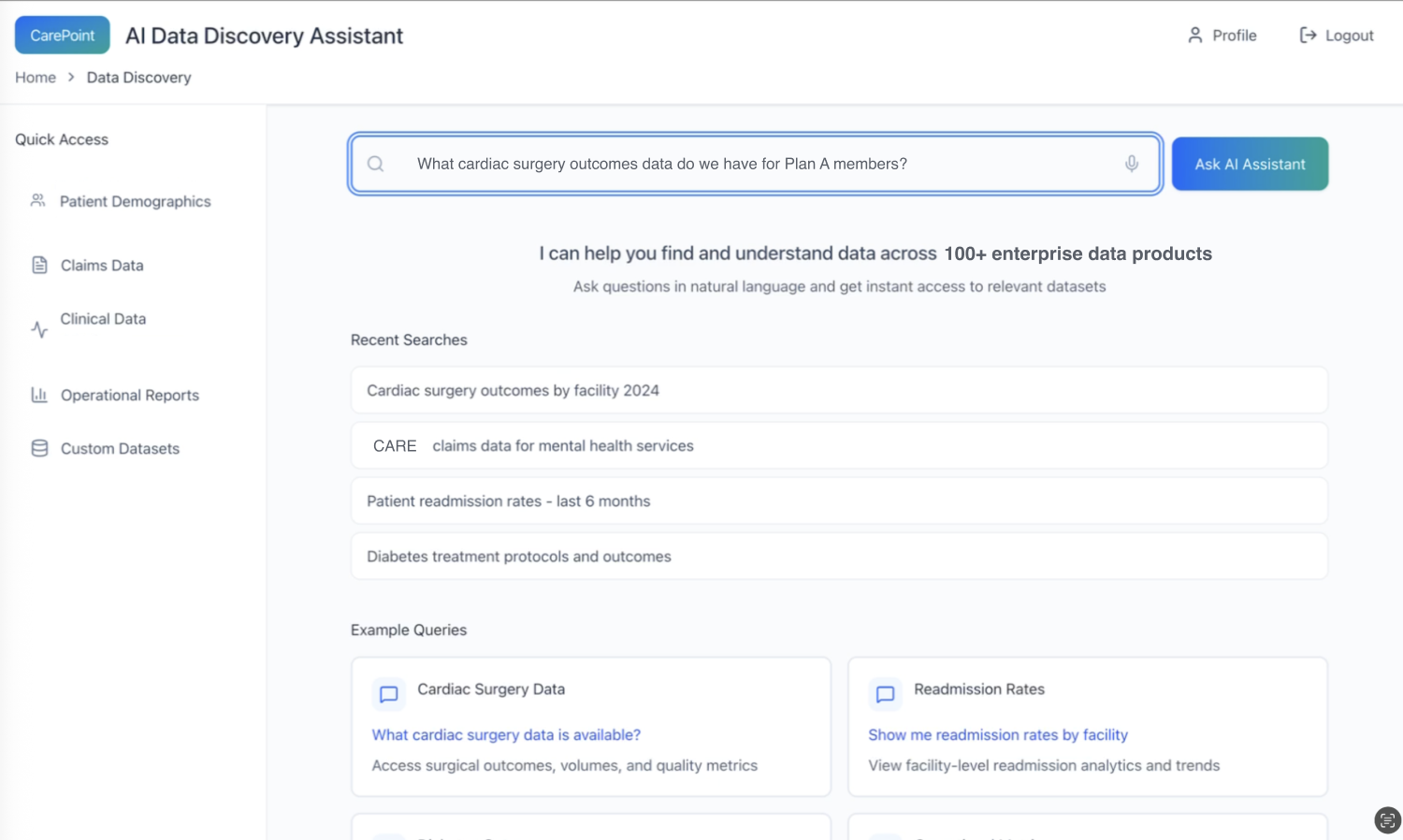
1) Intent capture in natural language
Pattern: Let users start with the question they actually have (not schema or table names).
Why it matters: Reduces translation burden and makes the assistant usable by non-technical stakeholders.
*Users ask in natural language; the system sets expectations and scaffolds common starting points (recent searches + example queries).
Step 2
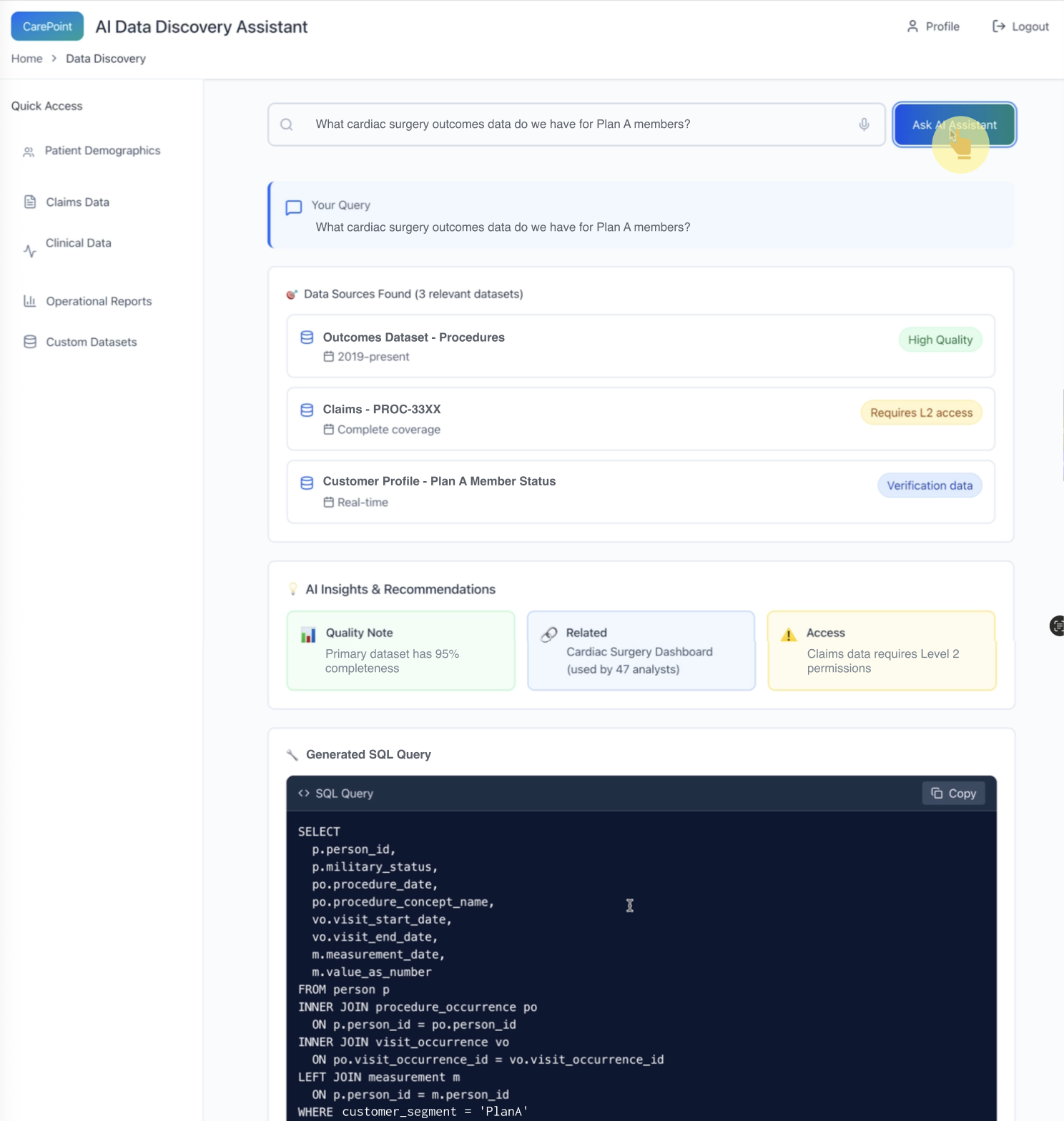
2) Source transparency + trust signals at the moment of selection
Pattern: The assistant returns candidate sources (not just an answer), with visible signals:
“High quality”
“Verification data”
“Restricted access”
Why it matters: This prevents over-trust and helps users choose the right source intentionally.
*AI proposes relevant data sources and surfaces trust/access constraints immediately—before the user goes deeper.
Step 3
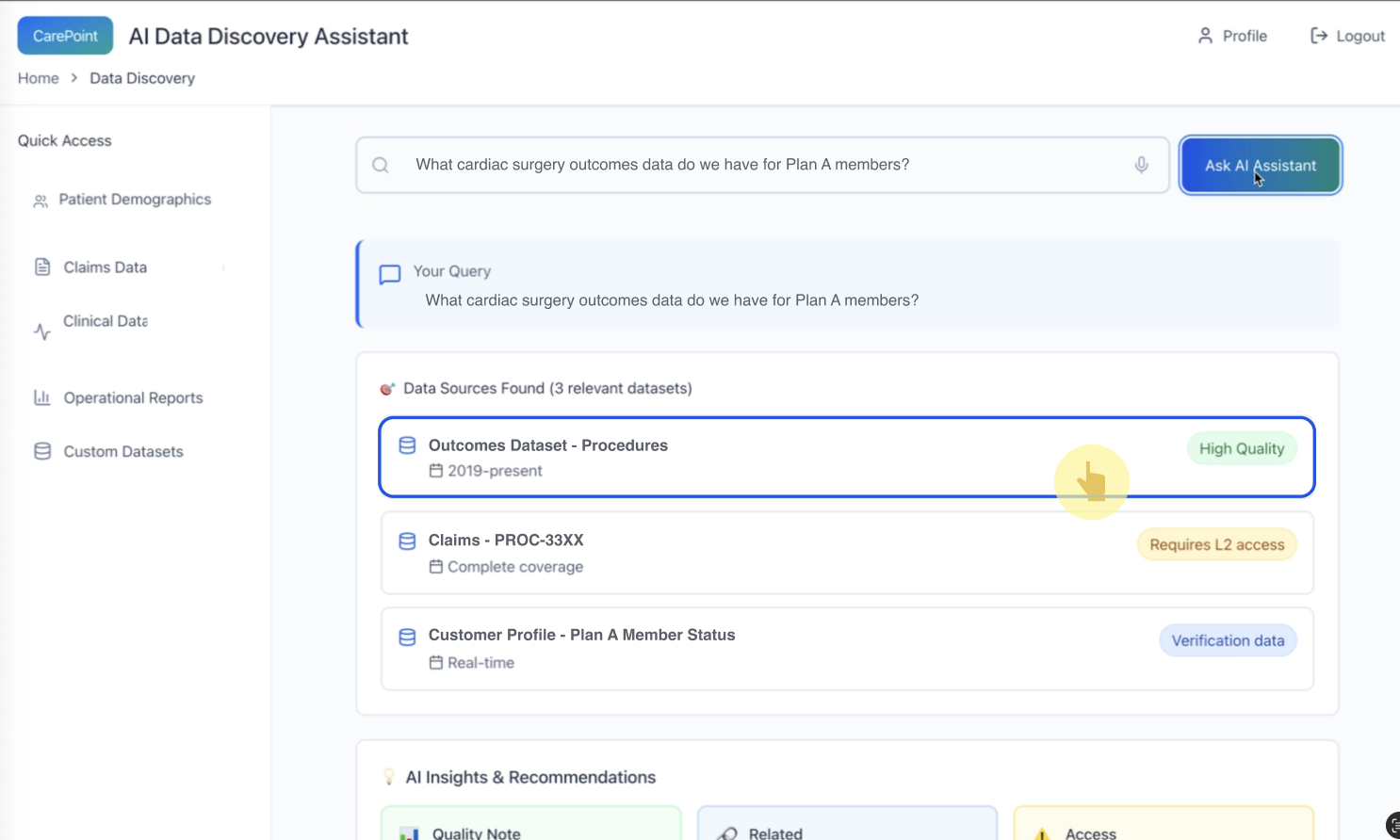
3) Decision support: helping the user choose the “right” dataset
Pattern: Dataset selection is a decision point. The UI makes the selection feel deliberate, not magical.
*The user explicitly selects a recommended dataset; quality cues remain visible to support confident choice.
Step 4
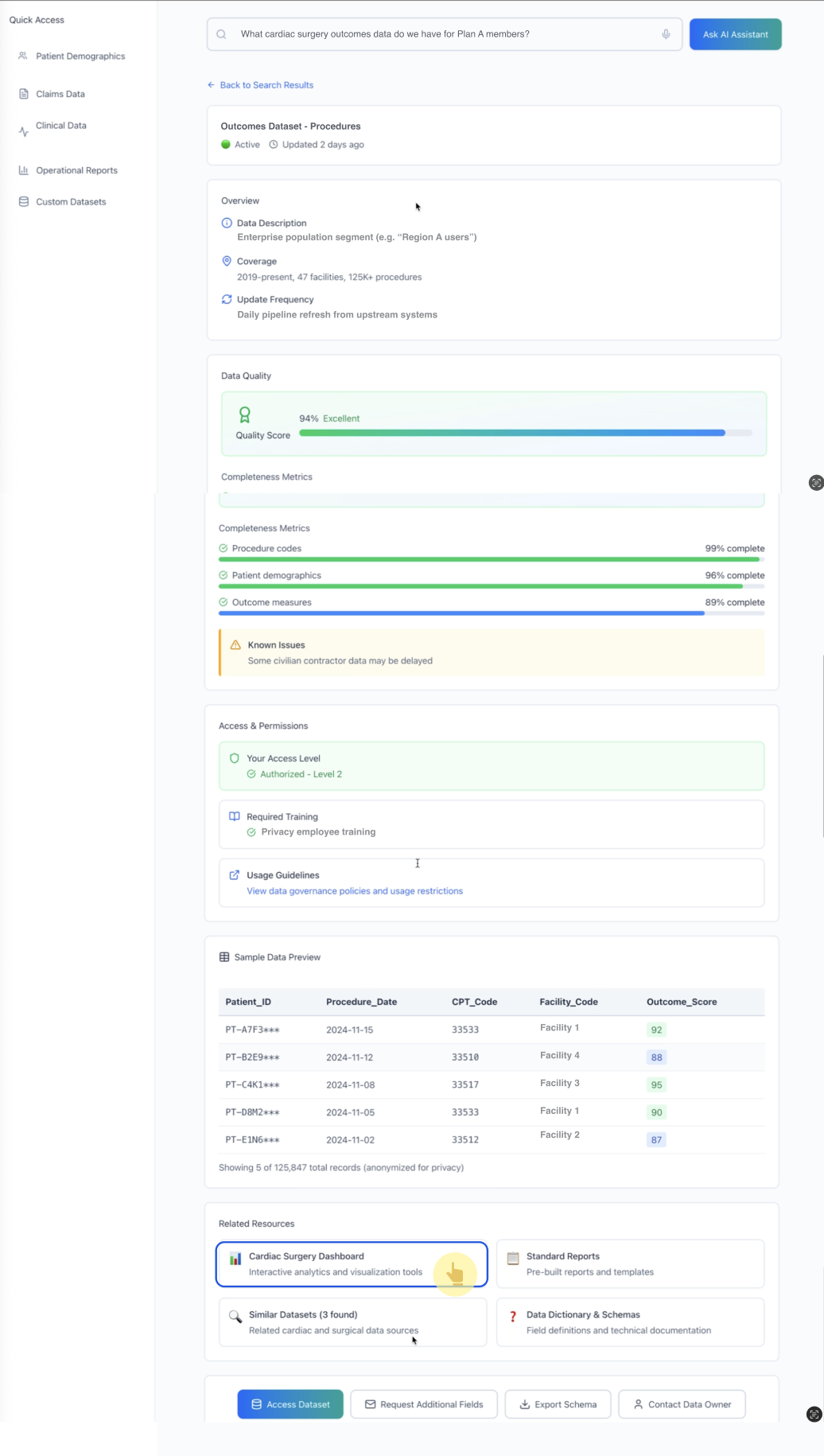
4) Trust-through-transparency at the dataset detail layer
Pattern: Once a source is selected, the assistant provides a structured “trust panel”:
coverage and update frequency
quality score + completeness metrics
known issues
access & permissions + required training
sample preview
Why it matters: In real operations, users need to understand why a dataset is appropriate and where it can mislead them.
*Dataset details make reliability legible (quality, completeness, known issues) and clarify governance requirements (permissions/training).
Step 5
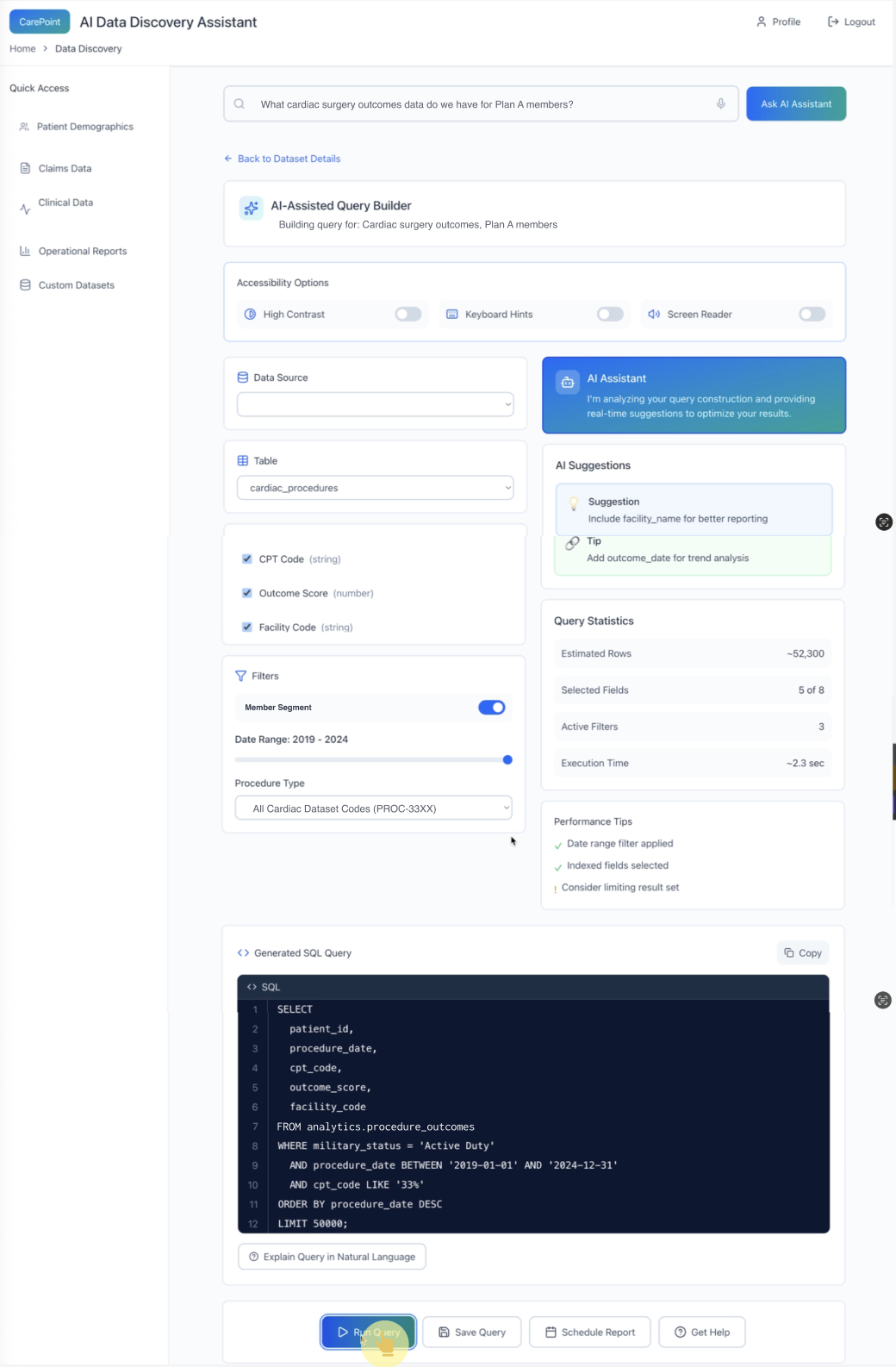
The assistant optimizes the query collaboratively and adds guardrails (cost/size warnings, performance tips) before the human runs it.
5) Assisted query building + guardrails before execution
Pattern: The assistant becomes a co-pilot:
suggests improvements (fields to include, better dimensions)
shows query statistics (estimated rows, execution time)
provides performance tips (filters, indexes, limit result set)
produces a reviewable artifact (generated SQL) + optional explanation
Why it matters: This is the “Agent Ops” layer—guiding behavior so the system is usable and safe in production.
*The assistant optimizes the query collaboratively and adds guardrails (cost/size warnings, performance tips) before the human runs it.
Edge cases I designed for (examples)
Ambiguous request: assistant asks a clarifying question (“by facility, procedure type, or time range?”)
Restricted data: assistant explains access limitation and routes user to request access or use an alternate source
Low-quality / incomplete data: assistant flags limitations and suggests validation sources
High-cost query risk: assistant recommends filters/limits before enabling “Run”
How I would measure success (and iterate)
Even as a concept, I framed evaluation like a production system:
Workflow success metrics
time-to-first-usable-result
task success rate (did they answer the question?)
number of failed runs / over-large query attempts prevented
access friction rate (how often blocked, and how quickly resolved)
Trust & collaboration metrics
user confidence rating (“I understand why this is the right source”)
frequency of source switching (signals poor initial ranking/clarity)
escalation / access request completion rate
Experiment ideas
confidence/quality indicator designs (variant A/B)
explanation depth (short vs detailed “why this source”)
when to prompt clarification (early vs late)
What this demonstrates (for conversational AI roles)
This work shows how I approach conversational AI beyond chat UI: I design human–AI collaboration patterns that make systems reliable in real workflows—through transparency, constraints-aware guidance, and safe execution guardrails.
“Building this assistant taught me that enterprise AI isn’t a chatbot—it’s an operations partner. The UX win is preventing avoidable mistakes by surfacing quality, permissions, and risk at the moment decisions are made.”